

Let’s build an MCP. How hard could it be?
MCP stands for Model Context Protocol. It's an open-source standard that works a lot like plugins for your LLM client. Many tools you already use—ChatGPT, Claude, Cursor, and others—support it out of the box.
At its core, MCP gives an AI a way to talk to external, non-AI systems. But it also unlocks something more powerful: agentic behavior. Instead of replying the moment you send a prompt, the AI can pause, call tools, gather extra data, and “think” before giving you an answer.
Some clients, like Cursor, behave this way by default. Others, like ChatGPT, use simple request–response interactions unless you connect an MCP server. Once you do, the model gains the ability to plan, reason, and act through your tools—not just chat.
What is MCP for a user?
Here’s a real example. A team had a market knowledge database connected through MCP. Instead of writing SQL queries, they could just ask Claude in plain English and get the results instantly.
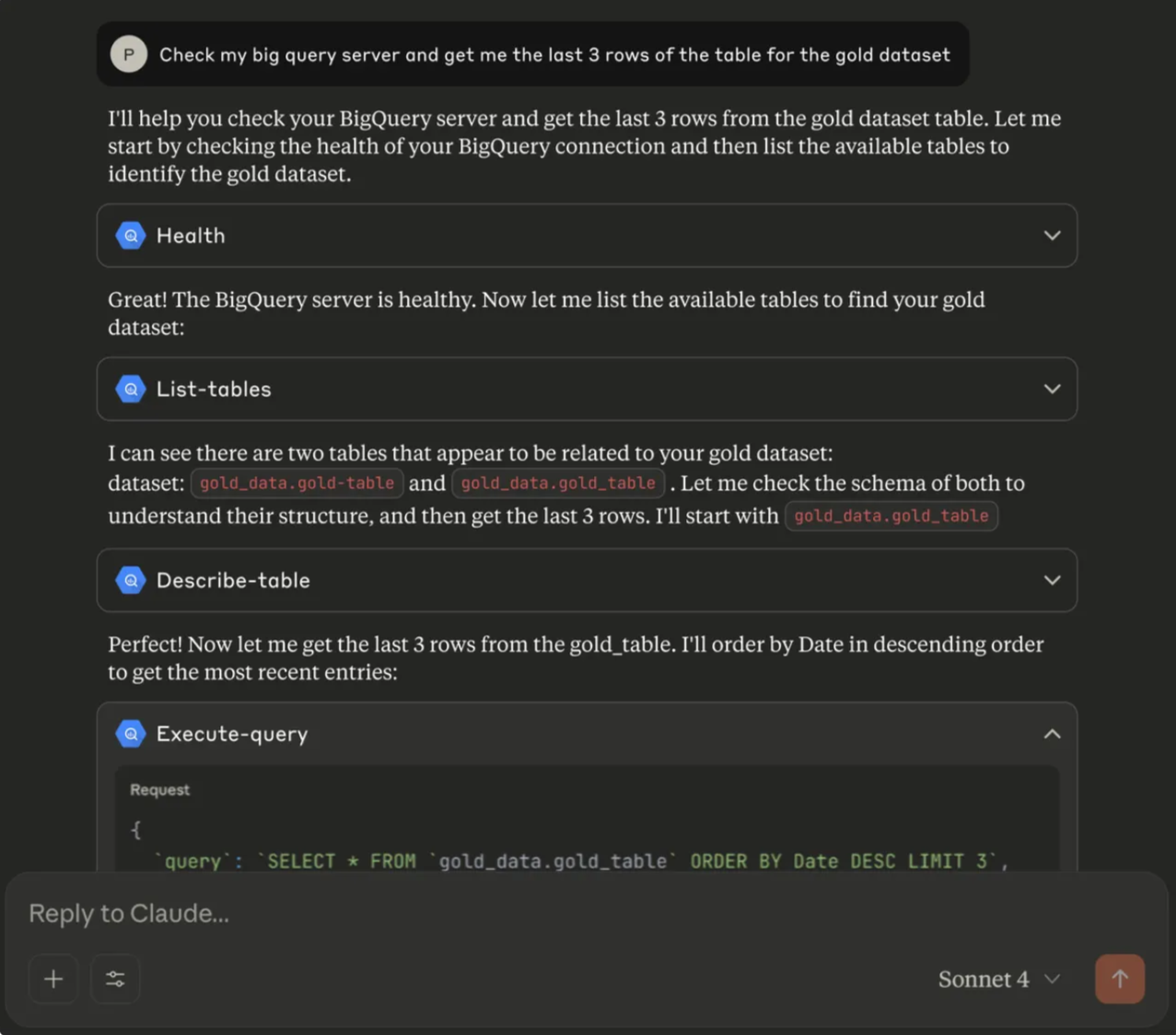
You can also imagine plugging your tracing tool, issue tracker, or documentation portal directly into Cursor. That way, you don’t just vibe-code — you can actually vibe-fix issues as part of your normal workflow.
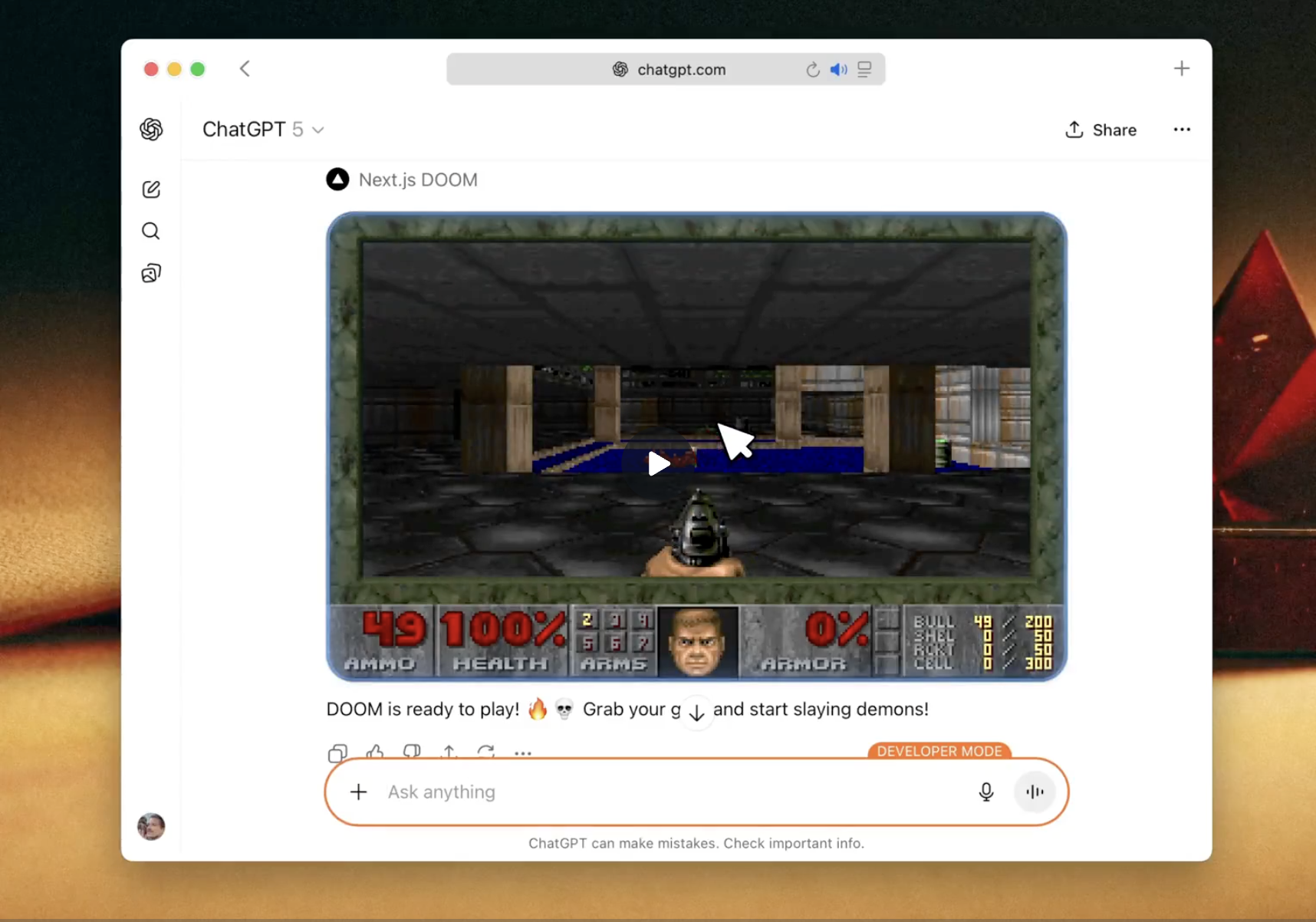
ChatGPT already supports some UI features too, so the possibilities keep growing.
And yes, MCP can run Doom!
What is MCP for a developer?
Here’s a simple view of how MCP works behind the scenes:
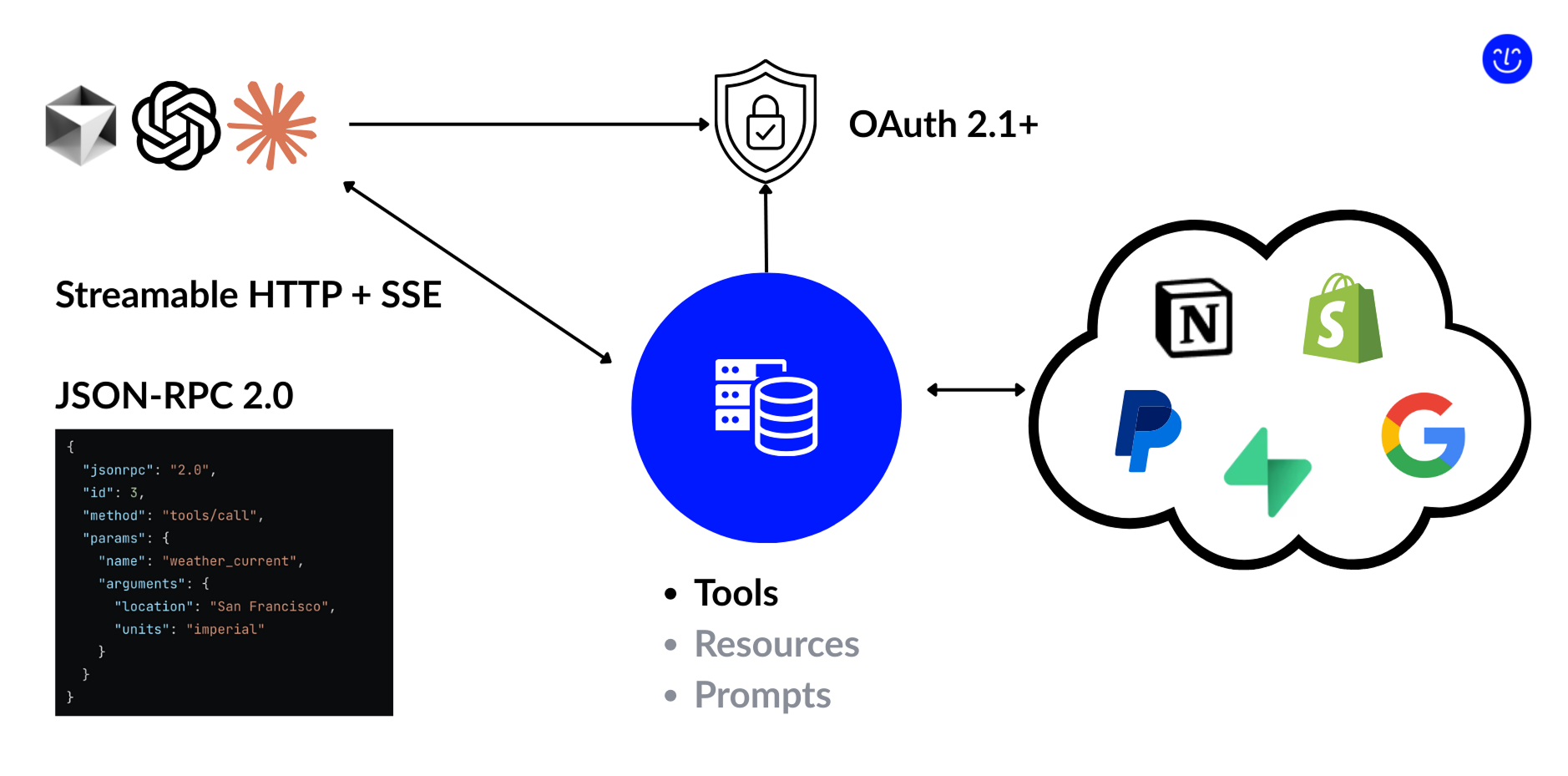
- The server exposes three main types of entities.
- Today, the most important of them is tools.
- Tools work a lot like API endpoints: inside a tool handler, you run the logic directly or call third-party services to do the job.
- Clients connect through an HTTP stream using Server-Sent Events (SSE).
- We’ll dive deeper into SSE later, but you can think of it as a form of push notifications. It gives the server a way to start actions on its own and send updates back to the client as they happen.
- The protocol itself stays very simple.
- The client and server exchange JSON-RPC text events. A screenshot above is an example of a typical event content.
- If you publish your server, MCP also supports OAuth 2.1.
- This lets you plug in an external or company-wide auth provider so you can control who gets access to your MCP server.
How to Build an MCP Server
So how do you actually build an MCP server?
The basic recipe is very short:
- Install an SDK.
- The two most common options today are the Node.js SDK and the Python SDK.
- Add configuration and metadata to your server instance.
- This includes things like the server name, description, and version info.
- Define the logic for your tool handlers.
- Each handler describes what happens when the client calls that tool.
- And that’s it!
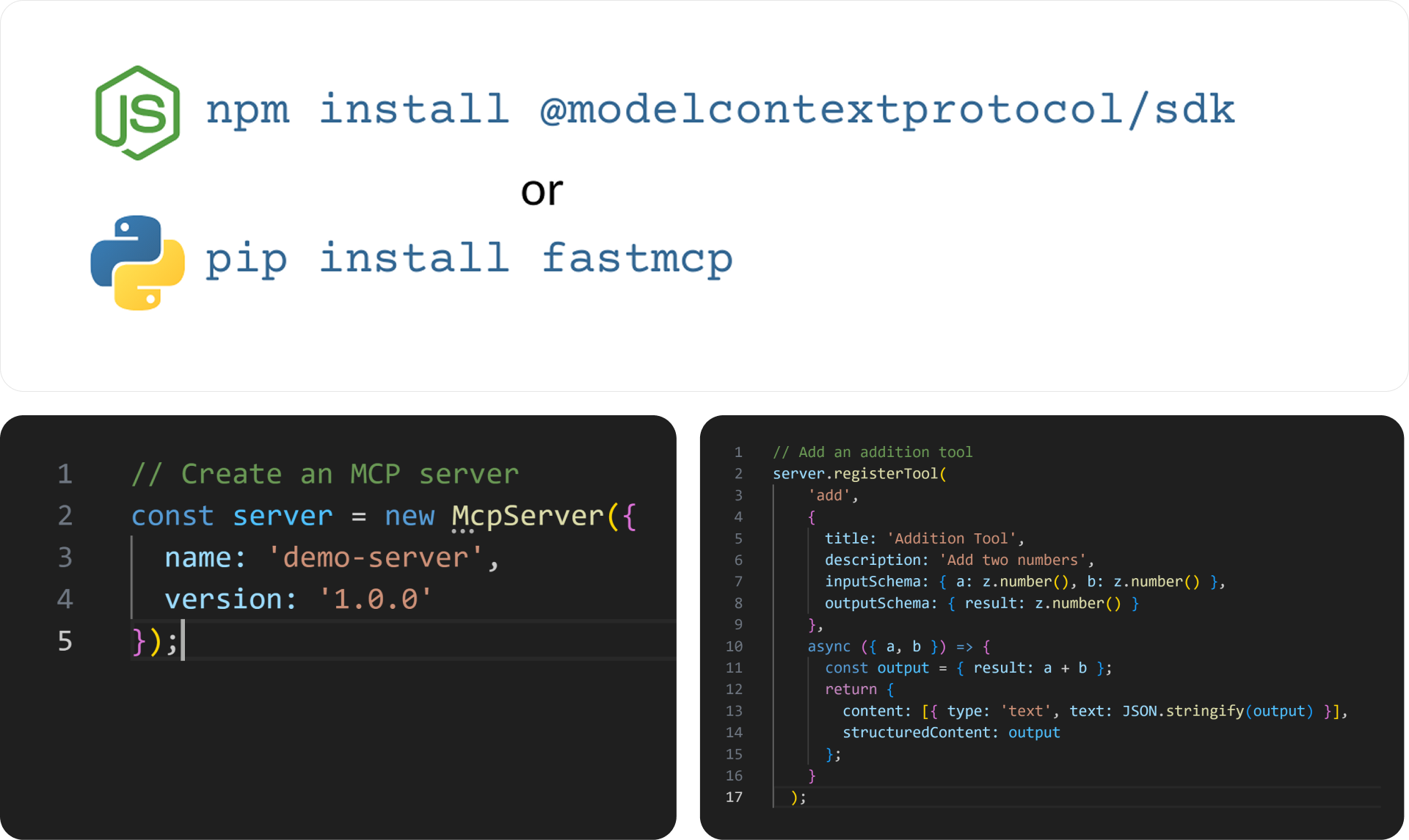
...for a demo or a small proof of concept.
But if you want your server to be usable — not only by you, but also by real users — then you’ll need to go further and deal with some challenges.
1. Client Capabilities
Working with MCP clients today feels a bit like the early days of the web. Every client supports the protocol slightly differently. If you want to be compatible with all of them, you should avoid relying on anything beyond basic tools.
Still, it’s worth checking the feature support matrix and choosing the right trade-off for your use case. Some clients support prompts, resources, or advanced features. Others do not. Using that matrix helps you decide how much complexity you can afford.
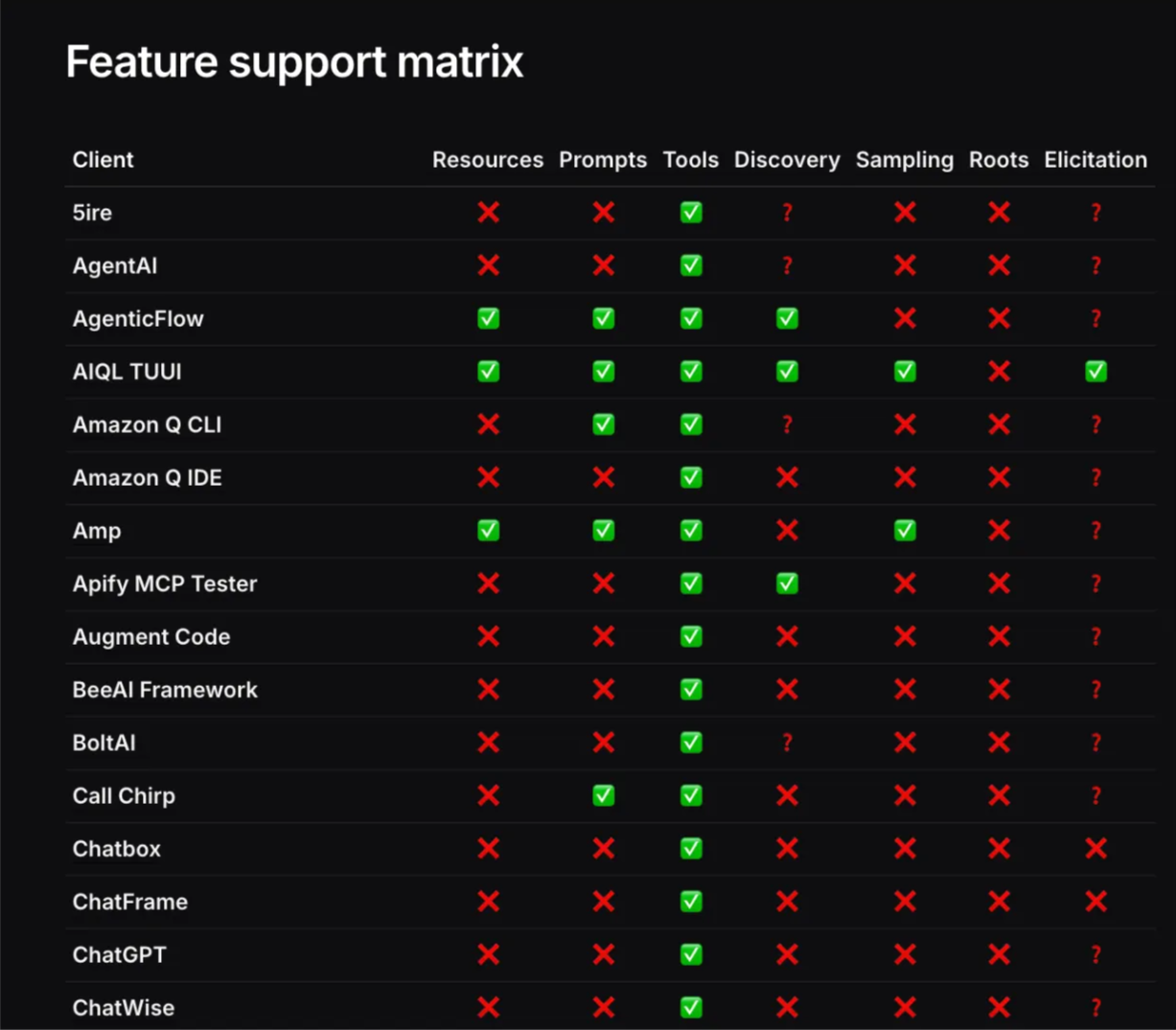
In most cases, when a client connects to a server, they exchange capability information. This lets both sides negotiate a shared set of features at runtime. You can use this to implement a compatibility mode, where your server falls back to only the features that both sides actually support.
Server-to-Client
There is a special group of MCP capabilities that let the server initiate actions toward the client. These features open the door to much richer interactions.
A server can send updates to the client. With this, you can make your tool list dynamic. For example, you might hide certain tools until the user finishes authentication, or show different tools depending on the current context. In an e-commerce setup, a product could be exposed as a resource, and your server could push updates when the price changes or when an order is shipped.
Elicitation lets the server ask the user follow-up questions before completing a task. Sticking to the same e-commerce example, the server could ask the user for a delivery address before finalizing an order.
Sampling works in a similar way, but instead of asking the user, it talks directly to the user’s LLM. This lets the server gather extra information without interrupting the user at all.
The main downside is simple: very few clients support these features today. But once they become widely adopted, they will make MCP servers far more powerful.
UI
Another interesting area is UI, even though you won’t find it in the capability table. That’s because UI isn’t officially part of the MCP protocol yet.
There is an initiative called MCP-UI. It tries to fill this missing piece by defining a way for servers to return UI elements. But right now it isn’t supported by existing MCP clients. In practice, MCP-UI is more like a library of React components you can use to build your own web client. And if you’re already building a custom client, you might not need MCP at all.
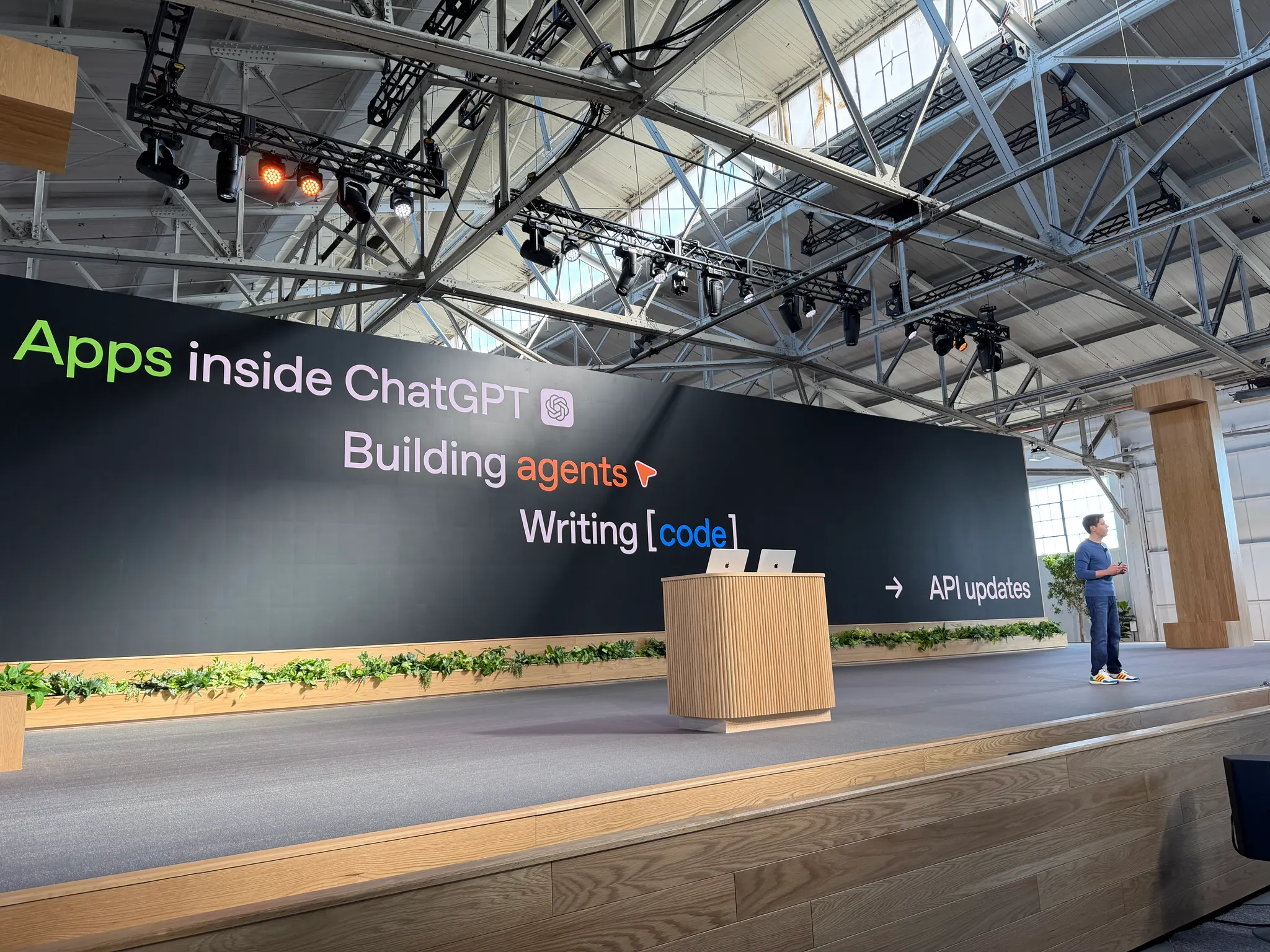
A few weeks ago, OpenAI released their own MCP support, extended with something very close to MCP-UI. Now, along with normal response data, a tool can return HTML that describes how the result should be displayed. It’s an early version of UI inside ChatGPT, but it already opens up a lot of possibilities.
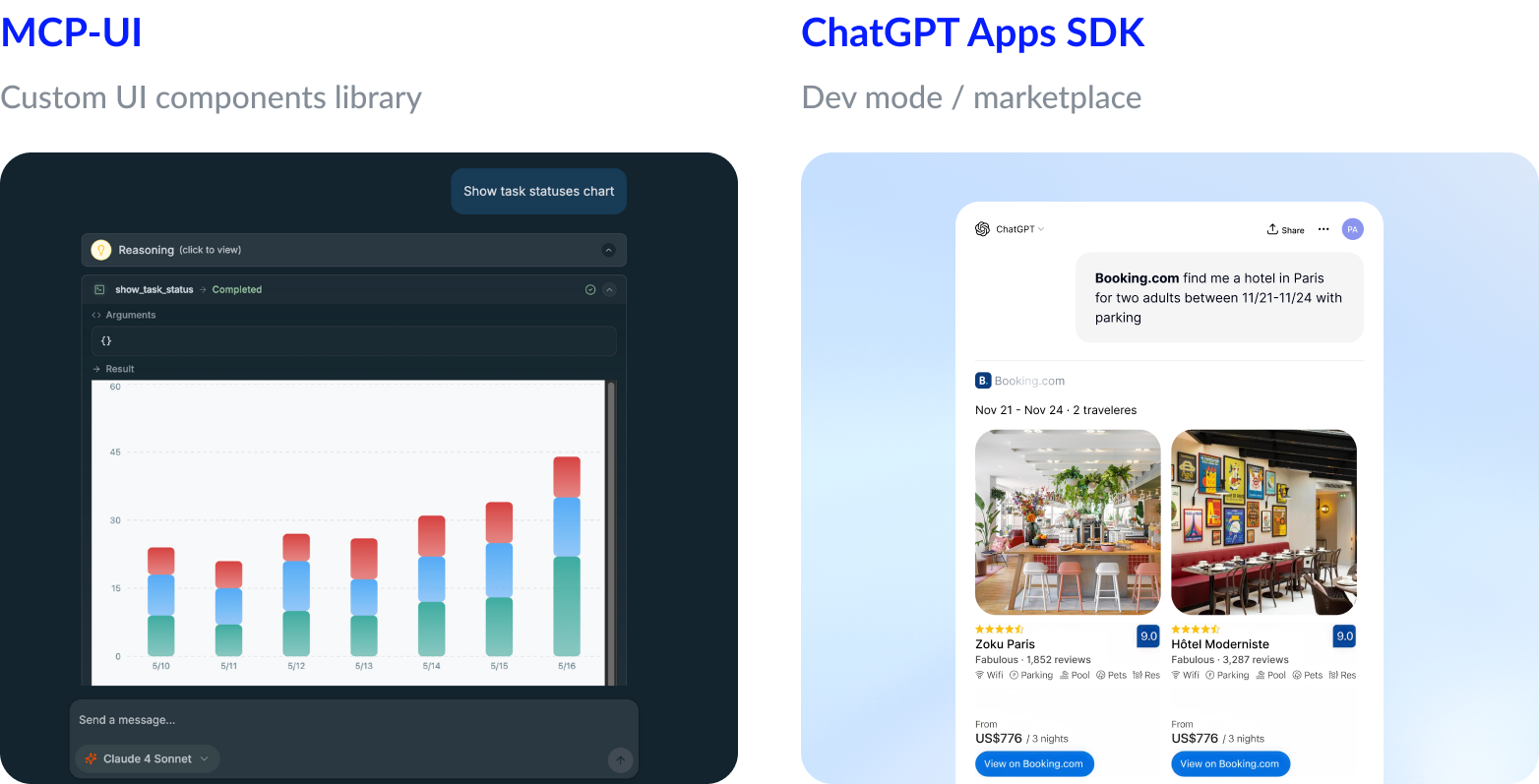
One thing to keep in mind: ChatGPT only shows custom UI if you enable Developer Mode, or if your server is published in the official marketplace, which is very restrictive at the moment.
Still, we believe this UI extension is a real game-changer — even though we do love a good terminal interface.
Client bugs
Another thing you have to keep in mind is bugs.
For example, Claude Code currently has around four thousand open issues. To be fair, not all of them are related to MCP, but it gives you a sense of how unstable things can be. On top of that, there are long discussion threads about how the protocol should evolve and what to change next.
I recently spent quite some time chasing a problem that turned out to be caused by a random 5-second delay during initialization. That delay was enough to put Claude into a broken state. You can imagine how enjoyable it was to debug and reproduce this issue.
The main point is this: not all clients fully follow the protocol, and things break or change more often than you’d expect. The safest approach is to find out which client your customers actually use and test your server specifically against that one.
2. Define Business Logic
Defining tool-handling logic comes with a few hidden challenges.
The first challenge is that your real user is an LLM, not a human. It’s tempting to dump all the information you have into the output and hope the model is smart enough to deal with it. But with LLMs, the more data you push into the context, the more likely you are to see hallucinations, missing details, or wrong assumptions. At some point, it simply stops working.
So you need to be careful about the amount of information you return, the format you use, and even the names of parameters, because all of that goes straight into the model’s context window.
The second challenge is choosing the right usage scenario. Agent-style workflows are still new, and it’s not always obvious when they help and when a simpler, non-AI solution works better. A few scenarios have already proven to work well: dropping the right docs into the context, or giving the LLM a tool that can search across a specific system. These patterns are what make vibe-coding possible.
The key is knowing when not to use a tool. Sometimes the simplest path is the best one. But with AI, a small amount of extra thought can reveal a much better way to structure the workflow — and in some cases, even unlock 10× better performance.
3. Evals
Evaluations are important because LLMs are non-deterministic. The same prompt can produce different answers, and a small change in the model version can break a workflow that used to work fine.
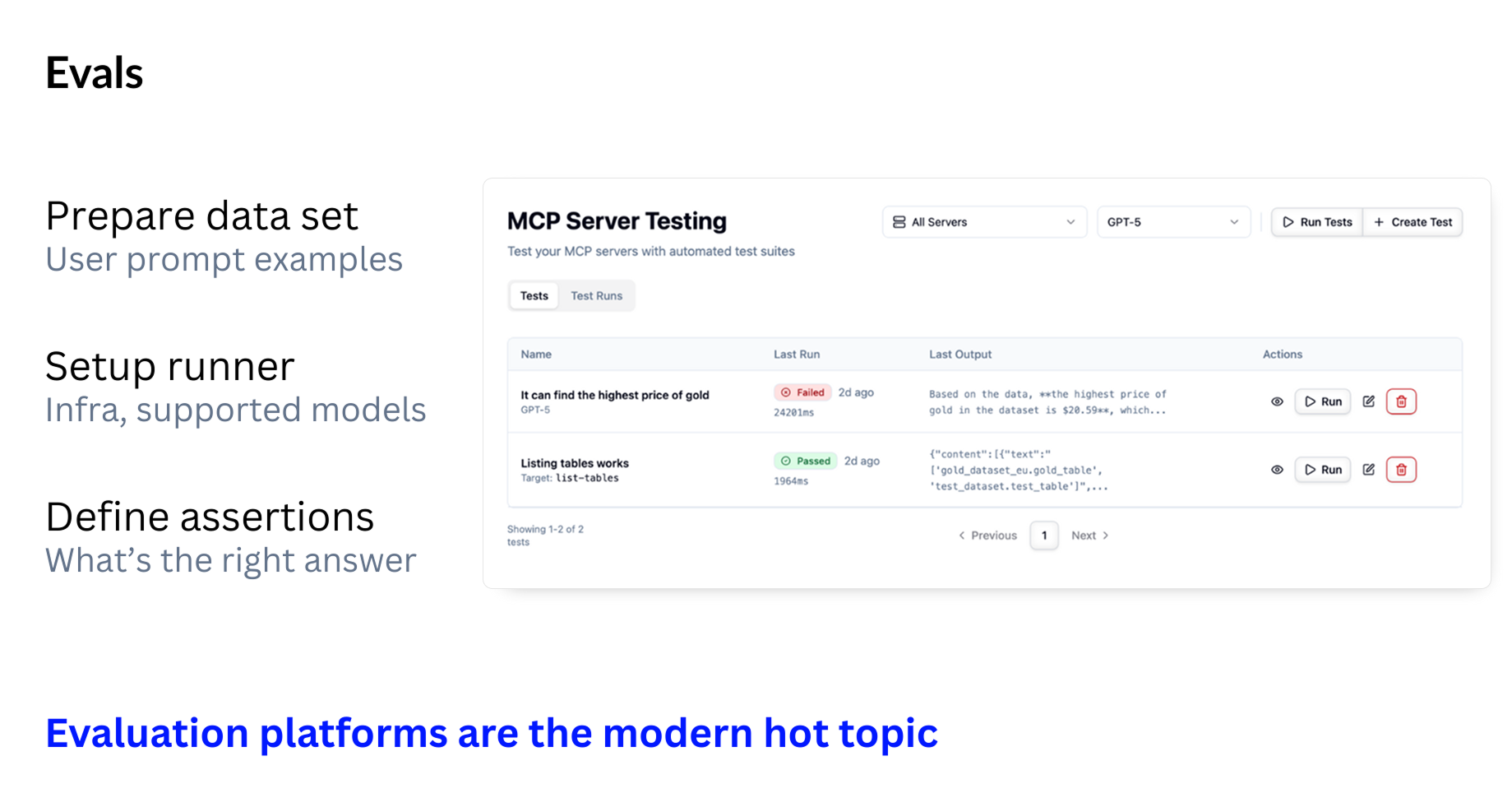
To make sure your MCP server behaves correctly, you need three things:
- A set of real user prompts
- These should reflect the actual tasks your server is expected to handle.
- A runner that executes these tests automatically
- It should call your tools through MCP, just like a real client would.
- A way to judge the results
- Because the output is not always identical, you need a mechanism to decide whether a response is “good enough.” Often this requires another LLM acting as a judge.
It’s also better to test with multiple models, even if you don’t plan to support all of them. A simple version update of the same model can change its behavior in subtle ways.
There isn’t a single perfect way to build evals. That’s why evaluation platforms are becoming a major topic in the MCP ecosystem — everyone needs them, and everyone is trying to solve the same problem.
Summary: What You Need Before Using Your MCP Server
Before you think about giving your MCP server to anyone else, it has to work reliably for you first. That means getting three fundamentals right:
- Align with client capabilities
- Each client behaves a bit differently, so your server should adapt to whatever the client supports.
- Define clear business logic
- Build tools that produce concise, LLM-friendly output and fit real usage scenarios.
- Prepare evals
- Test your server with real prompts and different models to catch regressions early.
Once these basics are in place, your server becomes usable — and now you can move on to the next challenge: sharing it with others.
4. Transport: STDIO vs HTTP
Earlier I said there was only one transport option — but that wasn’t the full story. MCP supports two ways for clients to talk to your server.
Most existing servers work over STDIO. In this mode, the MCP server runs as a local process on your machine and receives JSON-RPC events through standard input. This is simple and great for development.
But STDIO is not really shareable. Another person would need to set up the whole environment to run your server. And if they aren’t technical, you probably don’t want to explain how to install Node.js or manage runtimes.
There’s another issue: STDIO is single-threaded. It handles one event at a time.
HTTP, on the other hand, usually handles multiple events in parallel. And simply wrapping a single-threaded STDIO server inside an HTTP layer rarely works well.
If you want your MCP server to be used by others — even inside your own team — you’ll almost always need to support HTTP transport.
5. Setting Up a Client
Another tricky part for users is configuration.
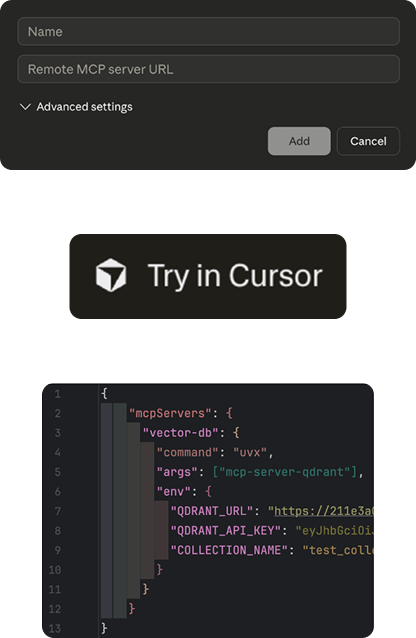
For a proper MCP server—one that:
- works over HTTP, and
- does not encode configuration inside the URL—
a single clean URL is usually enough to connect.
Some clients make this very smooth. For example, they support one-click deep links, so the user just presses a “Try in Cursor” button and the server is added automatically.
Other clients are less friendly. They still expect the old setup flow: the user must have npm and Python installed, locate a JSON config file, and edit it by hand to add commands and environment values.
Because of this variety, you should assume that not all of your users will be developers. The best thing you can do is provide a clear setup guide for non-technical users, with simple steps for each client you want to support.
6. Hosting
Once your MCP server runs over HTTP, you need to host it somewhere. In practice, you have three main options:
- DIY hosting — for example, running it on a VPS with Docker or deploying it with Cloud Run.
- An on-prem MCP gateway — like IBM ContextForge or Docker MCP Toolkit, if your company needs everything inside its own infrastructure.
- Specialized MCP hosting — platforms such as Ogment, or Smithery.
The choice depends on your requirements, but technically all three options are the same at the core: they are HTTP servers wrapped in Docker containers, just managed in different ways.
Dedicated MCP hosting often provides extra features out of the box: authentication, tool customization, evals, monitoring, and catalog visibility. The downside is that some platforms require a review process to get listed, and they may limit what your server can do.
Most hosting solutions also give you vertical scalability — you can add more hardware resources as your load grows. But for horizontal scalability, where you scale out across many instances, things get more interesting…
7. (Horizontal) Scalability
To scale horizontally, you first need to decide how your MCP server will run. In practice, there are three options.
Single server
You can run one shared server instance if you don’t expect many users. But this approach is fragile, especially if you’re wrapping an STDIO server. With STDIO inside, even two users can be enough to break the system.
If one user triggers a heavy request, the second one may not even be able to connect. Claude, for example, has a bug where it can get stuck in a broken state forever in this situation.
Because of this, the single-server approach is not recommended.
Server per request
Here, a fresh server instance is started for every tool call. This scales well, but comes with two drawbacks:
- you need extra work to restore or pass session state
- cold starts add latency
Still, for lightweight and stateless MCP servers, this model works reliably.
Server per session
Another option is running a server instance for each user session. This isolates users and avoids interference between them.
The trade-off is similar: if your server keeps state, you need to serialize it on restart or store the entire session somewhere.
Resource usage is another thing to consider. It’s easy to assume that a simple proxy to an external API should be cheap. But that isn’t always true.
For example, the FastMCP SDK buffers API responses before sending them to the client. If your server produces large outputs, you can hit memory limits quickly.
In general, the more stateless your MCP server is, the easier it is to scale. If you do keep state, be ready to serialize it externally so you can spin up new instances safely.
Summary: To Make It Shareable
To share your MCP server with colleagues, you need:
- Support HTTP transport
- Prepare a clear setup guide
- Host the server somewhere
- Make it scalable
Once you have all of this, your server is shareable — but still not ready for customers.
8. Authorization
Once you want to share your MCP server with real users, you need proper authorization. And there are many ways to do it — most of them bad.
Some servers put the token in the query parameters.
This is a great way to ensure your customers’ credentials end up in every network log.
Others pass the token as a tool parameter, or even expose a “login” tool.
That works too — if your goal is to let the next Cursor release auto-complete the user’s password right in the prompt.
The only correct option is to follow the protocol and use OAuth.
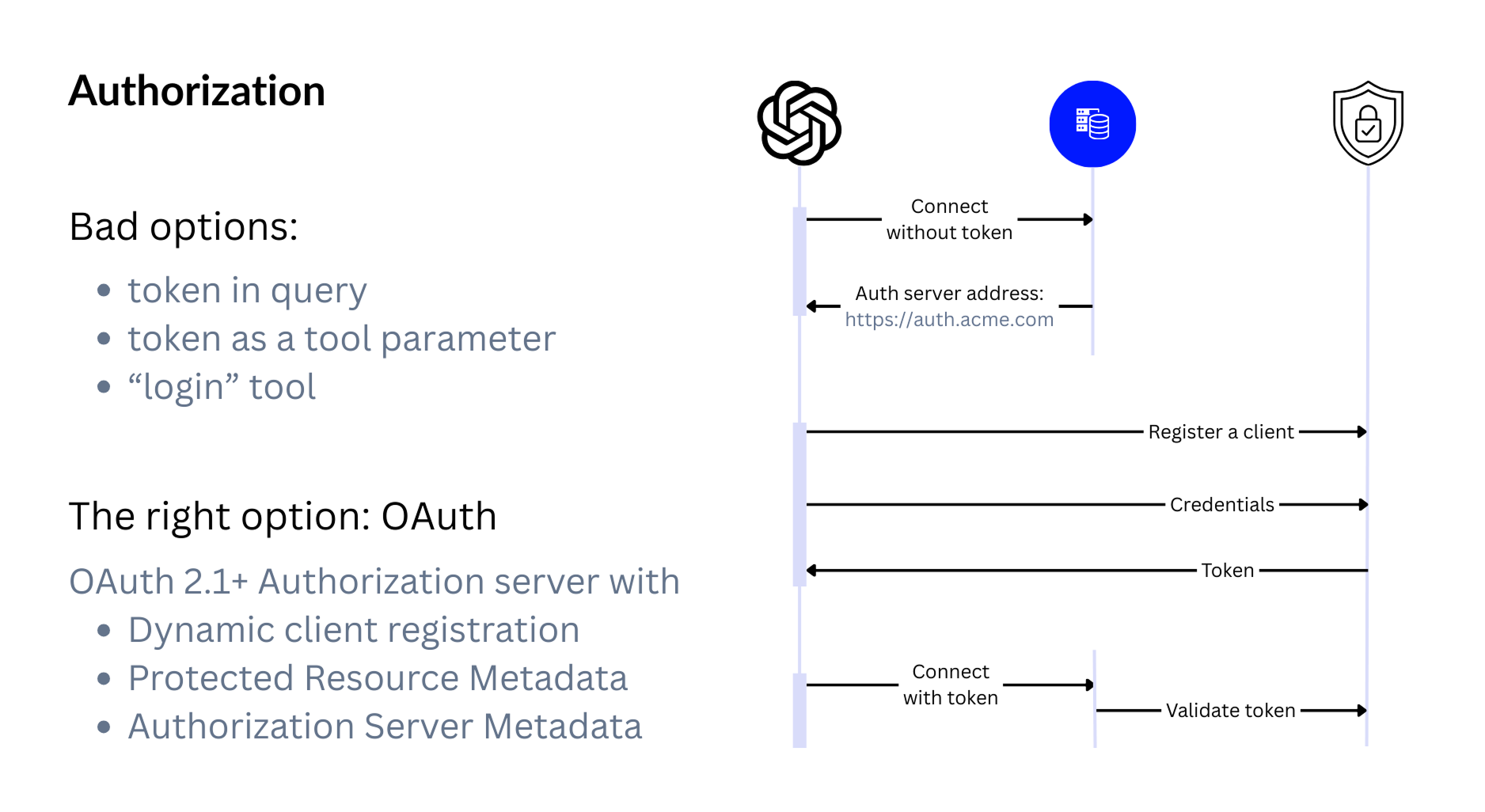
But not just any OAuth server.
You need one that:
- supports well-known endpoints,
- can handle multiple protected resources,
- and allows dynamic client registration, so a new client can be created on demand instead of hardcoding client IDs and secrets.
OAuth takes more work to set up, but it’s the only option that keeps your users safe and your MCP integration future-proof.
9. Tracing & Monitoring
To debug production issues, you need proper tracing and monitoring. MCP doesn’t include distributed tracing in the protocol, so you must rely on external tools.
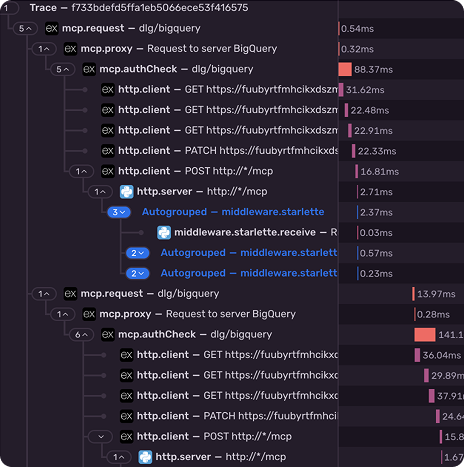
In the screenshot, you can see how we use Sentry to trace a single MCP session across all internal calls. Other options like Datadog, OpenTelemetry, or dedicated monitoring platforms work as well.
When choosing a platform, remember that you don’t control the entire agent — only your own tools. Because of that, solutions designed for full agent tracing, like Langfuse, won’t help much here.
Customers also tend to ask for usage analytics. They want to know which tools are used the most, how often certain workflows run, and where bottlenecks appear.
A handy source of analytics data is client-specific headers.
For example, ChatGPT sends requests from OpenAI’s backend servers, but it forwards the user’s IP address in a special HTTP header. The same header also includes the user’s ID, which can help you build user-level analytics without involving the LLM.
These pieces together give you enough visibility to understand how your MCP server behaves in the real world.
10. Configuration
Configuration in MCP is only loosely defined by the protocol, so every server handles it in its own way. In practice, there are three common patterns.
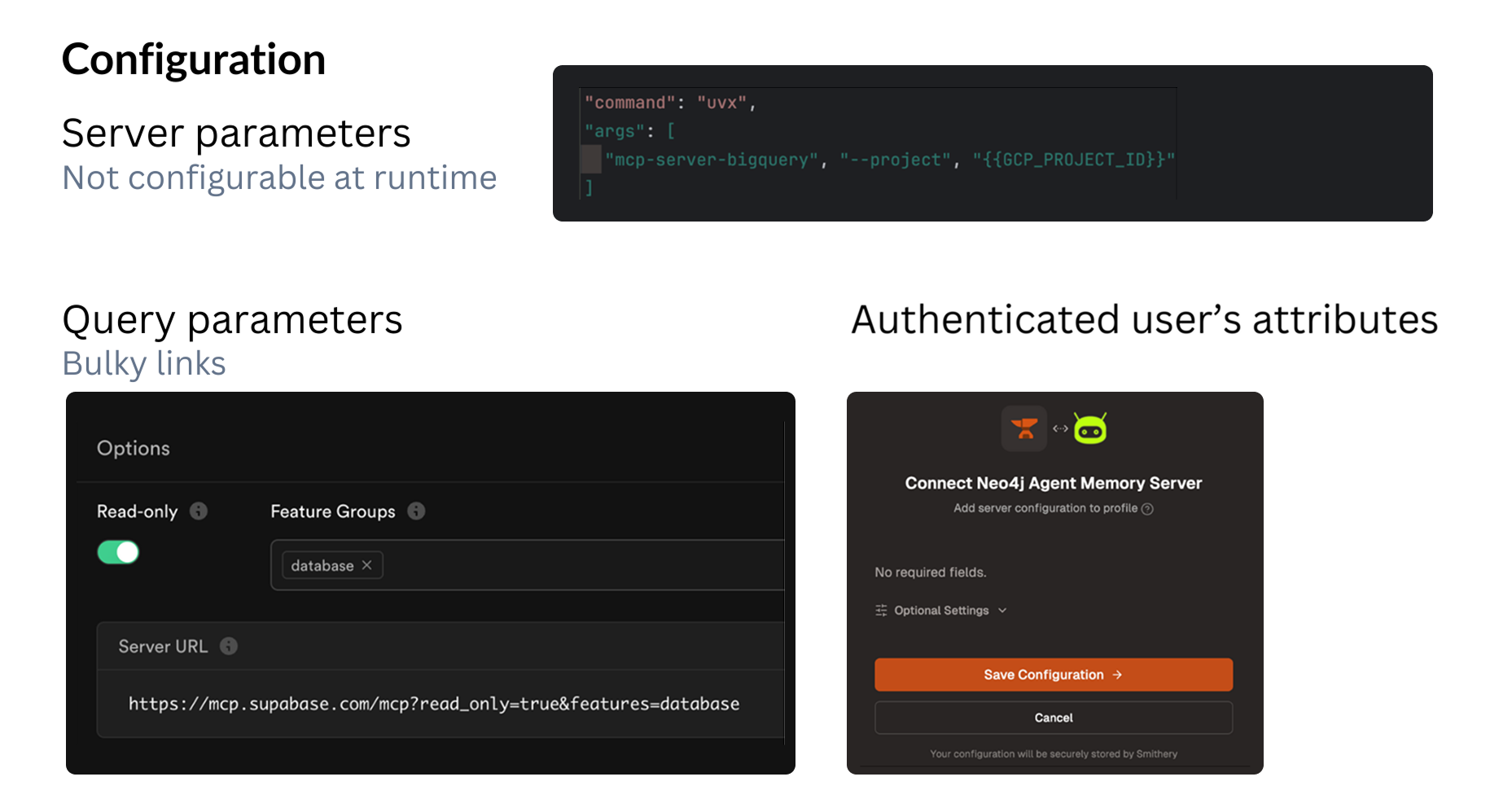
1. Environment variables or command arguments
A good example is the BigQuery MCP server. It can’t be configured at runtime, so all settings must be provided through environment variables or command-line arguments before the server starts. This is the simplest, but also the least flexible option.
2. URL-based configuration
Supabase takes a different approach: all configuration is passed through URL query parameters. They even provide a UI that helps you build these URLs. This makes the setup dynamic, but it also means sensitive settings might end up inside the URL.
3. Web-based configuration profiles
Platforms like Smithery — and Ogment as well — store all configuration in a web app. When a user connects and authenticates, they select a configuration profile, and the server uses that set of settings. This approach is the most user-friendly and works well for non-technical users.
Each method has trade-offs, but together they cover most real-world MCP setups.
11. Discoverability
Discoverability is becoming one of the biggest new topics in the MCP ecosystem.
Most MCP hostings and gateways now include marketplaces. Some let you publish a server instantly. Others require a submission and review process. Platforms like Smithery even scan GitHub automatically, looking for a metadata file in a specific format to detect MCP servers on their own.
ChatGPT recently introduced context-based auto-discovery. It decides which MCP servers might be useful based on the current chat conversation. This is a major shift, and it supposed to work across all supported MCP servers. Unfortunately, there’s not so many supported servers in ChatGPT at the moment.
It’s very similar to SEO, but for AI assistants. The community already calls it GEO: Generative Engine Optimization.
There are also a few early ideas for MCP equivalents of sitemap.xml — using a .well-known endpoint, a <meta> tag, or even a DNS TXT record. There’s no standard yet, but it’s wise to adopt whatever exists today so your server is as discoverable as possible.
Summary: To Productionalize It
To make your MCP server ready for real customers, you need to:
- Connect an OAuth provider
- Add tracing and monitoring
- Provide a way to configure it
- Plan for discoverability
At this point, your server isn’t just shareable — it’s production-ready!
How Ogment Helps
We built Ogment because it doesn’t make sense you all re-invent the 11 wheels, over and over agin.
Today, our no-code MCP builder gets your API spec to production MCP, in minutes — no SDK setup, no Docker configs, no OAuth implementation. Our builder handles transport, scaling, and auth, access management out of the box, making it easy to share your server across an organization or with external users. You also get monitoring, analytics, and evals without wiring up any external tools.
The hard parts? We've already done them. You just build the logic that matters.
⭐ Get started now, build your first MCP in minutes!



.jpg)